The MyŠkoda App
The MyŠkoda App gives you quick access to your car from your smartphone. To unlock the full set of features - including remote services and electric vehicle tools - your car must be equipped with Škoda Connect.
The MyŠkoda App
Stay close to your Škoda wherever you are
The MyŠkoda App works hand in hand with Škoda Connect, giving you a smarter way to interact with your car. From your phone you can check fuel or charge levels, mileage, service schedules and journey data at a glance.
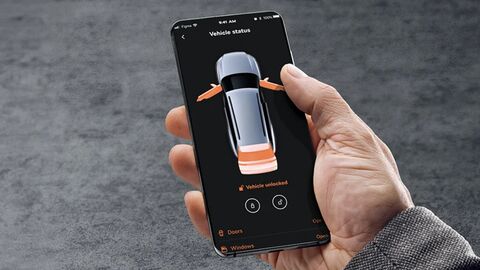
With Škoda Connect activated, you’ll also unlock remote features such as locking and unlocking, pre-setting the cabin climate, planning routes with live traffic updates, and locating your car with honk and flash*. The app also delivers personalised partner offers based on your driving routes, with savings on fuel, charging, restaurants, car washes and more.
The Škoda app is free to download on iOS and Android. Once installed, simply connect it to your car using your VIN to start exploring its features.

How to connect your Škoda
How to set up the MyŠkoda App
Setting up the MyŠkoda App is quick and straightforward. Once installed on your smartphone, it works together with Škoda Connect to give you access to your car and its features.
-
Download the app – Find the MyŠkoda App on the App Store or Google Play.
-
Create a Škoda ID – Register for a free account, or if you already have an account, simply sign in using your MyŠkoda login.
-
Add your vehicle – Enter your Vehicle Identification Number (VIN) to link your car.
-
Activate Škoda Connect – This step unlocks the full set of remote services, safety functions and EV tools.
-
Explore Track & Explore – If you’ve ordered a new Škoda, you can use this feature right away to follow your car’s production progress, check your chosen specification, and prepare for handover with checklists and how-to videos.
-
Choose your centre – select a Mon Motors Škoda dealership as your preferred service centre to book services, receive reminders and stay in touch.
If you’d like support setting up the MyŠkoda App or activating Škoda Connect, the teams at our Mon Motors Škoda Centres in Bristol, Gloucester and Weston-super-Mare will be happy to help.
Useful features for electric and plug-in hybrid drivers
MyŠkoda App for EV drivers
The MyŠkoda App enhances the experience of Škoda electric and plug-in hybrid models such as the Elroq, Enyaq, Enyaq Coupé and Superb Estate iV. Together with Škoda Connect, it gives you greater control of charging and everyday convenience from your smartphone.
You can check your current battery level and range, view charging details such as power output and remaining time, and set a charging limit to suit your routine. The app also lets you schedule charging to take advantage of lower-cost EV tariffs, as well as activate features like battery care mode, current limit and cable lock.
For longer journeys, the app helps you find and navigate to charging stations along your route, giving you confidence to plan ahead. You can also pre-set the interior climate while the car is plugged in, so your Škoda is comfortable from the moment you step inside without reducing driving range.