




The My SEAT app
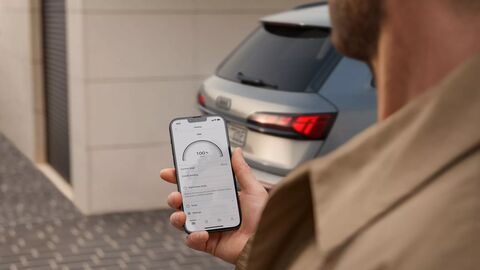
Stay connected to your Audi anytime, anywhere. The myAudi app brings together everything you need to get more from your vehicle, from remote features and real-time updates to simple service booking and charging insights. It’s a smarter, easier way to manage your Audi ownership.
Experience the myAudi App
Discover the Power of the myAudi App
The myAudi app puts your Audi experience at your fingertips. Whether you’re driving a new or an Approved Used Audi, it creates a seamless connection between you and your car. From remote vehicle access to service bookings, the myAudi app gives you more control, more insight, and greater convenience, all from your smartphone.
Once you connect the myAudi app to your car, you can check fuel or battery levels, mileage, range and servicing schedules in seconds, perfect for staying on top of your vehicle’s condition and planning your journeys. Compatible models also support remote features like locking and unlocking the doors, locating your parked vehicle, and pre-conditioning the interior*.
The app also helps you manage your Audi’s servicing and maintenance needs. Book appointments, receive reminders, and connect directly with your preferred Audi Centre. If you're driving a plug-in hybrid or fully electric Audi, you'll benefit from additional features like real-time charging status updates, scheduled charging, remote climate control, and nearby charging point information.
Getting connected
How to set up your myAudi App and connect to your car
Setting up the myAudi app is quick and easy. Follow the steps below, or watch the video for a full walkthrough.
- Download the myAudi app - Find the app on the App Store or Google Play and install it on your smartphone
-
Create an Audi ID - Open the app and register for a free myAudi account, or log in if you already have one
-
Add your vehicle - Enter your Vehicle Identification Number (VIN) to link your Audi to the app. You can find the VIN on your windscreen or in your registration documents
-
Verify ownership - To access full features, verify ownership and enter your MyAudi iD in the user management section
-
Activate Audi connect services - If your car supports Audi connect, you'll be prompted to activate these features to enable remote access, charging controls and more

Useful features for electric and plug-in hybrid drivers
MyAudi electric services
The myAudi app offers a range of features specifically designed for electric and plug-in hybrid vehicles. Whether you’re driving an Audi Q4 e-tron, Q8 e-tron, e-tron GT, or a TFSI e model, the app helps you stay informed and in control.
You can check your vehicle’s current range and charging status remotely, and schedule charging times to fit around your routine. This can be especially useful if you want to make the most of lower overnight electricity rates available through many EV-friendly tariffs.
The app also allows you to pre-condition the interior, so the car is at a comfortable temperature before you get in, without using battery power once you're on the move, helping to preserve your range. You can also locate nearby public charging points through the app, making it easier to plan ahead or top up while you're out.
Connect older Audi models with ease
Audi Connect Plug and Play
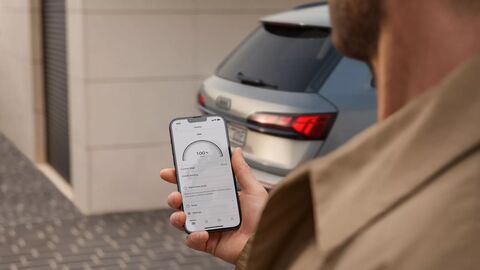
For drivers of older Audi models without an embedded SIM, Audi Connect Plug and Play offers an easy way to enjoy connected features. Available for many Audi models from 2008 onwards, this system uses the Audi DataPlug, which connects to your vehicle’s diagnostics port (OBD) and pairs with your smartphone via Bluetooth. Once set up with the free Audi Connect Plug and Play app, you can access a range of helpful functions designed to make everyday driving more convenient**.
With Audi Connect Plug and Play, you can track your trips and mileage, monitor fuel levels and driving range, and receive service reminders with direct booking to your preferred Audi Centre. The app also provides quick access to roadside assistance if needed. For those interested in improving their driving habits, it also offers driving style analysis.
Getting started is simple. Plug the Audi DataPlug into your vehicle, download the Audi Connect Plug and Play app from the App Store or Google Play, and follow the steps to pair your smartphone with the DataPlug. If you need any assistance, our teams at Audi Bath, Bristol, Cardiff, and Cheltenham will be happy to help you connect your vehicle and get the most from the app.
Terms & Conditions
*Features can vary by model and trim and may require the purchase of additional options and services. Not all features highlighted are available for all models. For more information please speak to your local Mon Motors Audi dealership. See the full terms and conditions for details.
**Please note the Audi DataPlug and the Connect plug and play App will continue to be operational until 31/12/2026, they will then be withdrawn from service.